ProFundCom Product & Service Notification 28th April 2026
As a user of the ProFundCom platform, we want to notify you that it has undergone some changes. We will send these notifications every time the platform is updated.
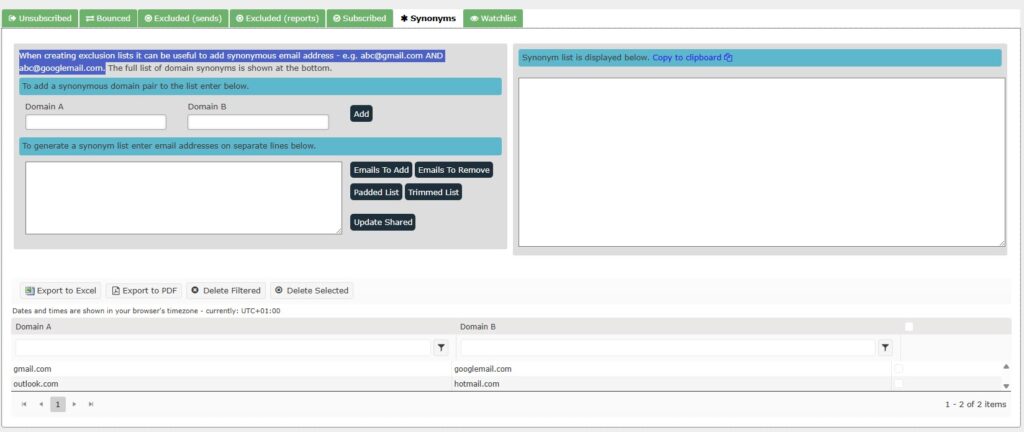
Domain Synonym Tool Impact: Medium Sections: Data Quality Studio Description: We’ve released a new Domain Synonym Tool to improve the accuracy and reliability of your exclusion lists within ProFundCom.
When managing investor communications, it’s common for a single contact to exist across multiple, synonymous email domains. A classic example is:
abc@gmail.com
abc@googlemail.com
While these addresses belong to the same individual, traditional exclusion logic would treat them as separate records — creating risk around duplicate sends, compliance breaches, or inconsistent messaging.
What this update does
The Domain Synonym Tool automatically recognises and links equivalent email domains, allowing you to:
Create cleaner exclusion lists by grouping synonymous email addresses together
Prevent duplicate sends across domain variations
Improve compliance confidence, particularly when managing opt-outs and suppression lists
Reduce manual effort in maintaining and auditing lists
How it works
When building an exclusion list, ProFundCom now intelligently accounts for known domain synonyms. If one version of an email is excluded, all recognised equivalents are treated the same — ensuring consistency across your communications.
Why it matters
In regulated environments, small data inconsistencies can create outsized operational and reputational risk. This update removes a subtle but important gap in list management, helping ensure that your outreach is both accurate and defensible.
Named Custom Blocks
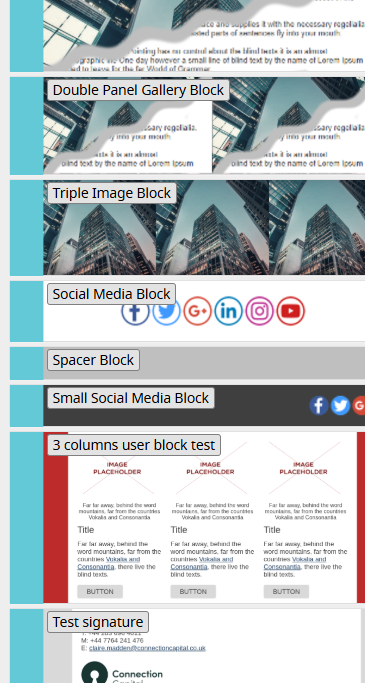
Impact: Medium Sections: Drag and Drop Editor Description: We’ve introduced a small but high-impact usability upgrade to the ProFundCom Drag & Drop (D&D) Editor: custom blocks now display clear, descriptive names directly within the block stack.
Previously, custom blocks were represented purely by their visual thumbnails. While functional, this made it harder—especially in larger templates—to quickly identify the right block, leading to slower build times and occasional selection errors.
What this update does
Custom blocks in the editor now include visible labels/names, making them instantly recognisable as you browse and build.
Key benefits
Faster email creation – no more guessing based on visuals alone
Improved accuracy – select the right block first time, every time
Better scalability – manage large libraries of custom blocks with ease
Enhanced onboarding – new users can navigate templates without prior familiarity
Why it matters
As templates become more sophisticated and modular, clarity in the build environment becomes critical. This update removes friction from the content creation process, helping teams move faster while maintaining consistency and control.
Send As Contact
Impact: Medium Sections: Drag and Drop Editor Description: We’ve enhanced ProFundCom’s testing and preview capabilities with “Send As Contact”, giving you a far more accurate view of how your communications will appear to real recipients.
When working with mail merge fields and conditional content, traditional previews can fall short—showing unresolved fields or displaying all conditional blocks at once. This makes it difficult to validate what an investor will actually see.
What this update does
“Send As Contact” allows you to preview and test emails as if they were sent to a specific individual, pulling in their real CRM data to fully resolve:
Personalisation fields (e.g. name, salutation)
Conditional content blocks
Region- or segment-specific messaging
Key capabilities
Test Emails as a Contact
Send a test email that renders exactly as it would for a chosen recipient—without actually sending it to them
Delivery Studio Previews
Select any contact and instantly regenerate previews across devices with all fields populated correctly
Manual Field Overrides
Adjust contact data on the fly (e.g. country, segment) to test different scenarios—without impacting your CRM
Subject Line Testing
Override subject lines in test mode to validate inbox appearance and messaging
Why it matters
This update removes one of the biggest blind spots in email QA.
Instead of asking “I think this is right”, teams can now confidently say: “This is exactly what this investor will receive.”
For marketing and IR teams operating in regulated environments, that’s critical. It reduces the risk of: